
Nothing is recorded without you
Scan and collector findings land in a Discovery pool category: found by a scan, not yet in inventory. You pick them one by one and delete what you do not want. Wrong guesses never reach the managed list.
A discovered device does not enter inventory until you approve it.
Inventory is the technical record of a device: type, vendor, model, serial, IP, MAC, firmware, location, status, assignment and lifecycle dates. Network discovery writes nothing straight into the list — findings wait in a separate discovery pool until you move them in. The screen opens with two scope cards, Products and stock and Infrastructure and monitoring, and from there you narrow down to one stack at a time. That same device record is the anchor tickets, configuration backups and renewal notices all hang from.
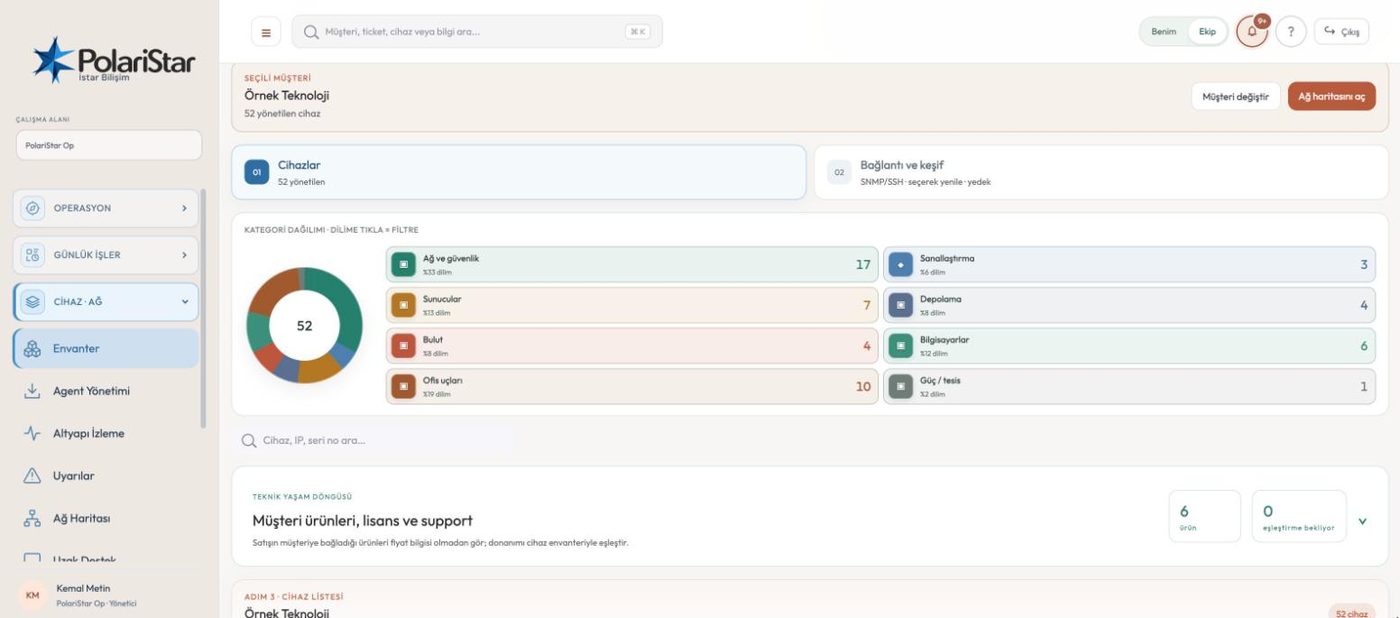
Scan and collector findings land in a Discovery pool category: found by a scan, not yet in inventory. You pick them one by one and delete what you do not want. Wrong guesses never reach the managed list.
Step 1 is the scope: organisation devices or customer inventory. If you chose a customer, step 2 is a search box or a pick from the list, and the device list opens as step 3. With hundreds of customers, only the site you picked is on screen.
In corporate mode the customer step is not there at all — there is a single company inventory. What MSPs call a customer is used here as a department and a place; no separate customer stack appears.
On the organisation stack you start an IP scan by giving a CIDR block, anywhere from /8 to /32, and you tick which services to check: 22, 23, 53, 80, 161/UDP SNMP, 443, 445, 8291 and 9100. The scan leaves from the Op or portal server; at customer sites the on-site collector does the same job and its findings land in the same pool.
Device scanning credentials sit on the Connection tab of inventory, not in the password vault. A profile is tied to a vendor, and only that vendor’s read-only identity and config commands are run. During a 161/UDP scan only the SNMP profiles marked “try automatically” are attempted, in order; a vendor profile that runs config commands is one you pick on the device card. Human-facing web and admin passwords stay in the vault.
The current owner, their email and their department stay on the record. Every handover is its own row: who used it, in which department, when it started, when it ended and who logged it. Previous users are written to history, not erased.
Licence, vendor support and warranty expiries are separate fields, and the purchase date is on the record too. Automation picks up every expiry inside 90 days and notifies at the 90, 30 and 7 day marks, keeping already-expired records apart. A renewal task opens alongside: the expiry becomes its due date, under 7 days is urgent and under 30 days is high. The same expiry never produces a second task.
You pick a customer and upload your existing list as CSV. The file is previewed, bad rows are reported by line number, and if a single row is invalid nothing is written. A device matching on serial — or on IP when there is no serial — is updated rather than duplicated. Up to 500 devices and 2 MB per import, and passwords and secret keys are not imported.
From a device you reach the tickets raised against it, the configuration backups taken from it, and its port and interface cards. The network map reads the same records, and its toolbar takes you back to inventory.
No. Scan and collector findings sit in a separate discovery pool and are not counted as managed devices. You decide what moves in, and you delete the rest.
No. PolariStar keeps four things deliberately apart: the product catalogue is a template, a quote is a price snapshot of its moment, a customer product is what is actually in use, and inventory is the physical device. Licences and services never create a fake inventory device; where it matters they are linked to a real one, and only to the same customer's device.
No, and the split is deliberate. Device scanning credentials live in the connection profiles under inventory, while human-facing web and admin passwords live in the vault. Revealing a vault entry needs its own permission, a re-authentication and an audit entry.
No. Each row is first matched on serial, or on IP when the serial is blank, against that same customer's existing records. A match is updated and the rest are added. The result tells you how many were inserted and how many updated.
No. A technical role sees the device, model, quantity, linked product and the licence, support and warranty dates. Sale price, cost, margin and supplier fields are not merely hidden in the interface; they are never put in the API response.
In the portal they see only their own devices and their own expiry dates — neither the organisation inventory nor any other customer. In corporate mode inventory and the LAN stay with the company: it sends only the devices it picks one by one, and Op sees nothing it has not accepted.
Field and systems teams, IT managers tracking assignments, and whoever owns warranty and renewals.
Let us open a workspace for you and try it with your own customers and devices. We will guide you through setup and data migration.