No agent mandate
Bringing a hundred-device network under monitoring does not mean a hundred installs: one collector goes on the LAN and the rest is read over the network. This is a deliberate break from approaches that put an agent or WMI on every host. Switches, storage and printers — things you cannot install anything on — are monitored the same way.
The protocol order is fixed
The default path is read-only SNMP, v2c or v3. Vendor REST or Redfish, also read-only, is optional and only opened when deeper data is needed. An agent on the host comes up only when PC or operating-system level detail is required — it is third in line, not first.
Nothing is written to devices
The collector pushes no configuration to any device; access is granted with read-only credentials. SNMP community strings and SSH details sit in encrypted columns. The flow is one-way: the collector pushes data to its own tenant, and no door is opened into the network from outside.
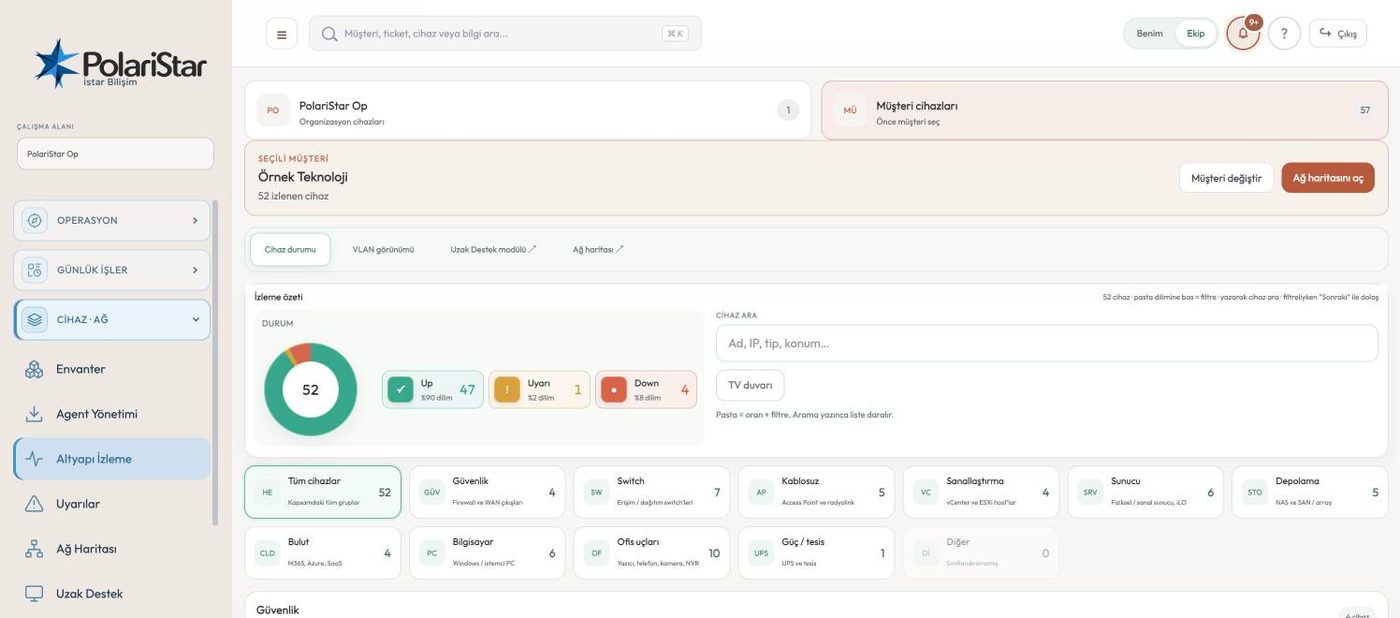
Device status at a glance
Up, warning and down sit as a ring above the list, and clicking a segment filters it. Cards refresh roughly once a minute, and “refresh now” triggers it by hand. SNMP port state follows the collector's scan interval, not the screen's refresh rate.
No invented alarms
Nonsense values from a wrong OID — an impossible fan speed, a PSU that is not there, a capacity the hardware could not physically hold — never become alarms. The value is either rejected or corrected against what the model is known to be. A monitoring system earns trust in the hours it stays quiet; one false alarm at 3am spends that trust for good.
Vendor profiles
For each vendor, the protocol, the enrichment step and the UI panel the data lands in are declared in a single profile file — the equivalent of a Zabbix template. Adding a brand means writing a profile, not writing code. Depth is being added vendor by vendor in the lab: NetApp ONTAP first, then Synology, HPE MSA and Dell storage, Cisco MDS and Brocade, then iLO, iDRAC and CIMC.
Panels split by purpose
Devices are grouped by role: security and gateway, switching and wireless, storage, endpoints. Environment readings (fans, PSUs, temperature) and network ports live in separate panels. Rather than dumping every SNMP value into one table, the data is split by what the person looking is actually after.
Thresholds and alerts kept apart
Device type groups and threshold values are defined on the Monitoring tab in Settings, and the monitoring screen applies them. The alarms they raise collect in their own list on the Alerts screen instead of crowding the live status view. Port state changes are recorded as well.
Wall display and linked tabs
The monitoring screen switches to a stripped-back wall display for a NOC screen, so the team on shift can read the state off the wall. Scope works like inventory: the whole organisation, or the selected customer (department in company mode). Network Map and Remote Support open as links from their tab headers.