PolariStar — İstar Bilişim Türkçe Request a demo

← All modules

Planning

Tasks, Waiting Items and Meetings

Work that is not a ticket does not fall through either.

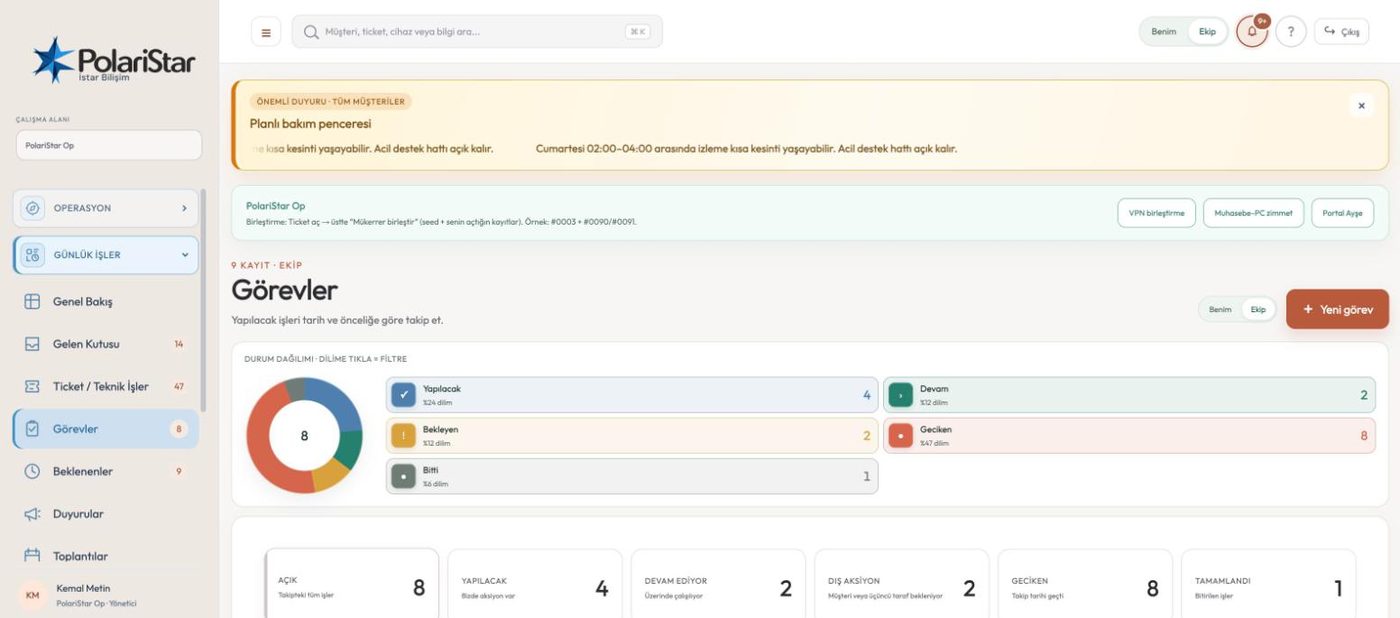
Not every piece of work is a support request. A task can hang off a ticket or stand on its own, and it is not the same record as a ticket — even in the database it lives in its own table. The Waiting screen gathers everything blocked on someone else. A meeting record holds the decision, the task it produced and the ticket link together, so work discussed in a meeting does not end with it.

From the PolariStar panel, with demo data.

Dates are optional

Work of the “waiting for a good moment” kind can be opened without a date; it still gets an owner and still sits in the list. Dated tasks that slip feed the OVERDUE TASKS counter on the Op overview; in organisation mode the same slot shows the open task count.

A task does not close the ticket

One ticket can carry several tasks, in sequence or at once. Finishing a task closes only that task; the ticket and the other linked tasks are untouched. Closing the ticket stays with the person authorised to do it, together with the closing summary.

Waiting: whose court

The Waiting screen (Pending in organisation mode) splits in two: tasks blocked on outside action, and waiting tickets. Who is being waited on is written on the record, so the “is it us or them” question is answered by reading the list.

Completed tasks stay visible

Finished tasks remain in the ticket history. You can open a new task under the same ticket later, and read the finished work next to the new work. Nothing has to be cleaned up to move forward.

A meeting is more than notes

The meeting record keeps attendees, agenda notes, decisions and next steps as separate fields, alongside location, date-time and visibility, and carries links to tasks and tickets, and meetings are scheduled from inside this module. What a decision turned into is visible on the record, and the link is not broken.

Tasks carry their origin

A task record keeps the meeting it came from. The “we will do this” from a meeting can be opened weeks later and still read with its source.

Mine / Team switch

The scope switch in the top bar works here too: only what is assigned to you, or the whole team. You can read team load without changing your default view.

Tasks that open themselves

Not every task is created by hand. License, support and warranty end dates raise a task and a notification at the 90, 30 and 7 day marks; the task records which automation produced it and lands in the same list as the rest.

Before and after a meeting — on the roadmap

Suggesting an agenda from open tickets, pending actions, upcoming license expiry and past decisions, and then preparing the internal summary separately from the decision summary sent to the customer (the department, in organisation mode), are planned. The meeting record and its links exist today; these two steps do not yet.

One ticket-linked task, start to finish

  1. 1A meeting produces a decisionThe decision is written on the meeting record and tied to an existing ticket or to a task about to be opened. That link stays on the record.
  2. 2The task is openedTitle, owner and the related ticket go in. If the work is not tied to a particular day, the date is left blank and the task still sits among open work.
  3. 3The work blocks on someone elseIf a part is due from a supplier or an approval from the customer (the department, in organisation mode), the task moves to the waiting-on-outside side and appears on the Waiting screen.
  4. 4The answer arrives, the task closesOnce the outside action is done, the task is closed. Only that task closes: the ticket stays open and the other tasks under it are untouched.
  5. 5The same ticket gets a new taskIf the fix needs a second step, a new task is opened under the same ticket. The completed task stays in the ticket history and the new one sits beside it.
  6. 6Closing is an authorised actEven when every linked task is finished, the ticket does not close by itself. That call belongs to the authorised person; the time spent and the work log stay on the ticket.

Frequently asked

Do I have to open a ticket for every piece of work?

No. Tickets are for requests that come in from the other side; internal work items are opened as tasks. A task can be attached to a ticket, or stand alone.

Will an undated task get lost?

It sits in the same list as dated tasks, falls under the Mine/Team scope, and counts as open until it is closed. Having no date keeps it out of the overdue counter — lateness can only be measured against a date you set.

Does finishing a task close the ticket?

No, and that is deliberate: tasks and tickets are separate records, so completing a task closes only that task. The decision to close the ticket, with its closing summary, stays with the authorised person.

What is the difference between Waiting and Tasks?

Tasks lists the work in your hands and your team’s. Waiting gathers the work where the ball is in someone else’s court — tasks blocked on outside action and waiting tickets — on one screen.

How is a meeting record different from taking notes?

Notes are text; a meeting record is linked. Whatever task or ticket a decision turned into is recorded, and the task carries its source meeting. Updating a decision’s status automatically when the linked work finishes is on the roadmap; a meeting never closes itself in any case.

Do tasks sync to Outlook and Microsoft To Do?

Not yet. The roadmap starts with a one-way, safe export and later adds two-way date and status sync over Microsoft Graph. When it lands, customer technical notes will not be copied into calendar descriptions, and the PolariStar task id will be stored on the external record so nothing is created twice.

Who it helps

Team leads, technical owners who plan ahead, and anyone who wants meeting decisions to stay tracked.

Related modules

See it on your own operation

Let us open a workspace for you and try it with your own customers and devices. We will guide you through setup and data migration.