Tasks don't close tickets
Several tasks can be opened under one ticket over time. Finishing a task closes that task only; the ticket and the other linked tasks are untouched. This is not a setting but the data model: tickets and tasks are separate tables in the database.
Closing stays with people
A customer can report from the portal that the problem is solved, and the ticket does not close. The status becomes “customer resolution confirmed”, and the technical team checks it and closes it. The close comes with the closing summary of the person running the process.
Channel on every record
The source field holds seven values: phone, in person, internal, email, portal, other and unknown. Other is the catch-all for channels like WhatsApp and SMS. In the list, the “who opened it” chips roll those values up into coarse groups.
Filter from the ring
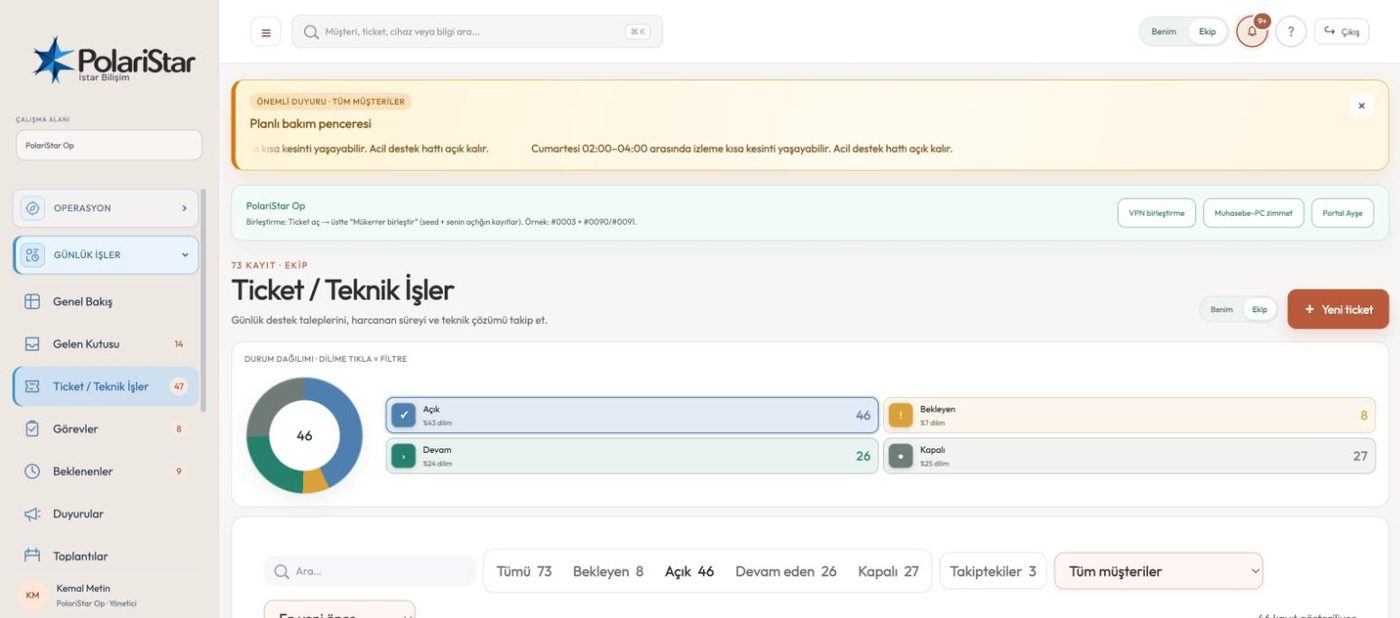
Open, in progress, waiting and closed sit as a ring above the list. Clicking a segment filters the list — there is no separate filter screen to visit. Counted filter chips, the customer picker and sorting sit on the same row below it.
The waiting party is explicit
When the status is Waiting, the party, the person involved and the action expected are their own fields. The Waiting screen gathers everything held up by a customer, your own team or a third party in one page, so whose court the ball is in has a single answer.
Work logs and time
Every intervention is recorded with date, owner and duration. Handovers and changes of owner land in the same log as their own lines, so you can see how the record passed from hand to hand. Time accumulates on the ticket.
Device linking is optional
A ticket can be attached to an inventory device, but it does not have to be. Internally only the selected customer's devices are listed; in the portal only those of the signed-in company. A device id outside that scope is rejected at the API.
Mine or Team
The scope switch in the top bar flips any list between what is assigned to you and what the whole team has. The Following chip separates records you want to watch without being assigned — following is not the same as ownership.
It feeds the report
The support report filters by owner: the whole team, one person, or unassigned records. It exports to Excel and CSV with the owner column included. Linked tasks and handovers never create new tickets, so your ticket counts stay honest.