
Mail is not a ticket yet
This is a deliberate product decision, not a missing feature. Cleaning up a wrongly opened record costs more than reading one message once. The queue is where an item waits before it is allowed to become work.
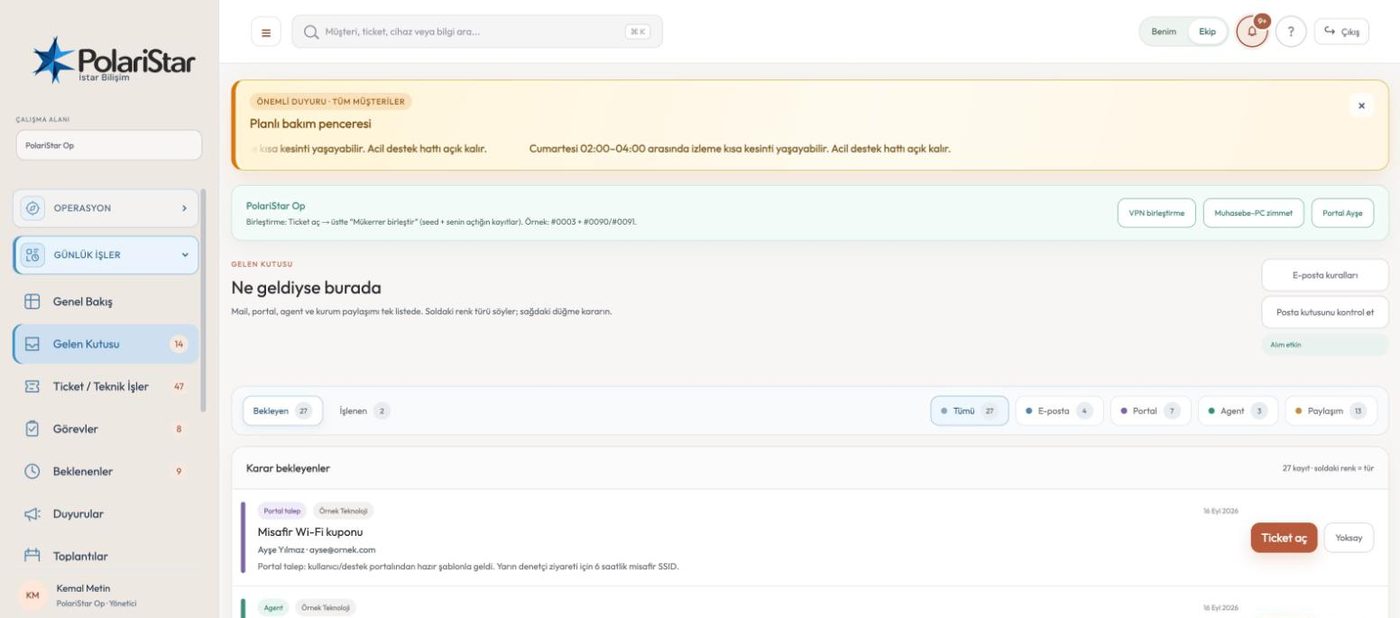
Email from a customer does not turn straight into a ticket. It lands in the inbox as a raw item first; an operator reads it and either attaches it to an existing ticket or opens a new one. The screen is labelled “whatever came in, it is here”: pending and processed items sit in separate tabs, with channel filters across the top. Collection does not happen inside the application but in a separate worker service that checks the mailbox every 60 seconds. The outbound side belongs to the same module: status and resolution changes reach the requester as templated email.
This is a deliberate product decision, not a missing feature. Cleaning up a wrongly opened record costs more than reading one message once. The queue is where an item waits before it is allowed to become work.
Status tabs split into Pending and Processed. A channel filter narrows to All, Email, Portal or Agent-sourced items. The pending pile and closed traffic never mix in the same list.
Which senders and domains may raise a request is defined on the inbound email tab in settings. Mail from an unlisted source creates nothing on its own. That keeps an unknown sender from writing directly into your work queue.
A reply in the same thread is added under the related ticket instead of opening a new one. Three replies from a customer are meant to give one record with three messages, not three records. Whether a follow-up message lands on the right ticket is not yet treated as verified; it sits on the roadmap as an improvement item.
IMAP polling runs in its own container, inbound-worker, which scans the mailbox once every 60 seconds. Incoming mail is stored in its own table, apart from the ticket table. When something goes wrong, the service log tells you which layer it went wrong in.
Changes to status, owner and resolution notify the requester. The wording lives on the notification templates tab in settings, and sending runs through a queue tied to your SMTP configuration. Changing a template does not mean touching code.
Being an administrator does not mean receiving every ticket email. Subscription is defined per user rather than per role, so someone with broad permissions can stay off the list. The point is simple: not filling mailboxes nobody reads.
Portal requests and agent-sourced items land in the same queue and separate out through the channel filter. Portal users are set up by invitation, managed on their own settings tab. On the WhatsApp side a webhook endpoint exists as a notification channel.
The mail queue and ticket creation from it have been seen working; the counter for ignored mail and the behaviour of the following message are still unverified. Two items are logged as open risks on the notification side: notifications occasionally being skipped, and mail reaching an administrator who has nothing to do with the ticket. We are not describing them as solved.
Because removing a record that should never have existed costs more than reading one message. Marketing mail, auto-replies and off-topic threads stay in the queue instead of polluting your list. You can widen or narrow which sources may raise a request through the inbound email rules in settings.
No. Mail outside the allowed address and domain definition raises nothing on its own and waits in the queue. The ignore counter and the handling of the following message are not yet treated as verified.
That is the design: replies in the same thread are added under the existing ticket, one record with messages stacked in order. The behaviour of a follow-up message is still waiting on live verification, so we do not state it as a guarantee.
Notification subscription is per user, not per role, so being an administrator does not subscribe you to anything. That said, mail reaching an unrelated administrator is logged as an open risk, and notification subscription needs retesting.
Sending runs through a queue and a send record is kept. How much of that history is exposed on screen, and manual resend control, are still among the items we need to settle — so we are not calling this finished.
The inbox collects email, portal and agent channels. Phone and in-person requests have their own values in the ticket's source field, while WhatsApp and SMS fall under “Other”. On the WhatsApp side a webhook endpoint also exists as a notification channel.
First-line teams taking incoming requests, and managers who want to decide which mail traffic is allowed to create work.
Let us open a workspace for you and try it with your own customers and devices. We will guide you through setup and data migration.