PolariStar — İstar Bilişim Türkçe Request a demo

← All modules

Technical memory

Knowledge Base

Work you solved becomes knowledge ready for next time.

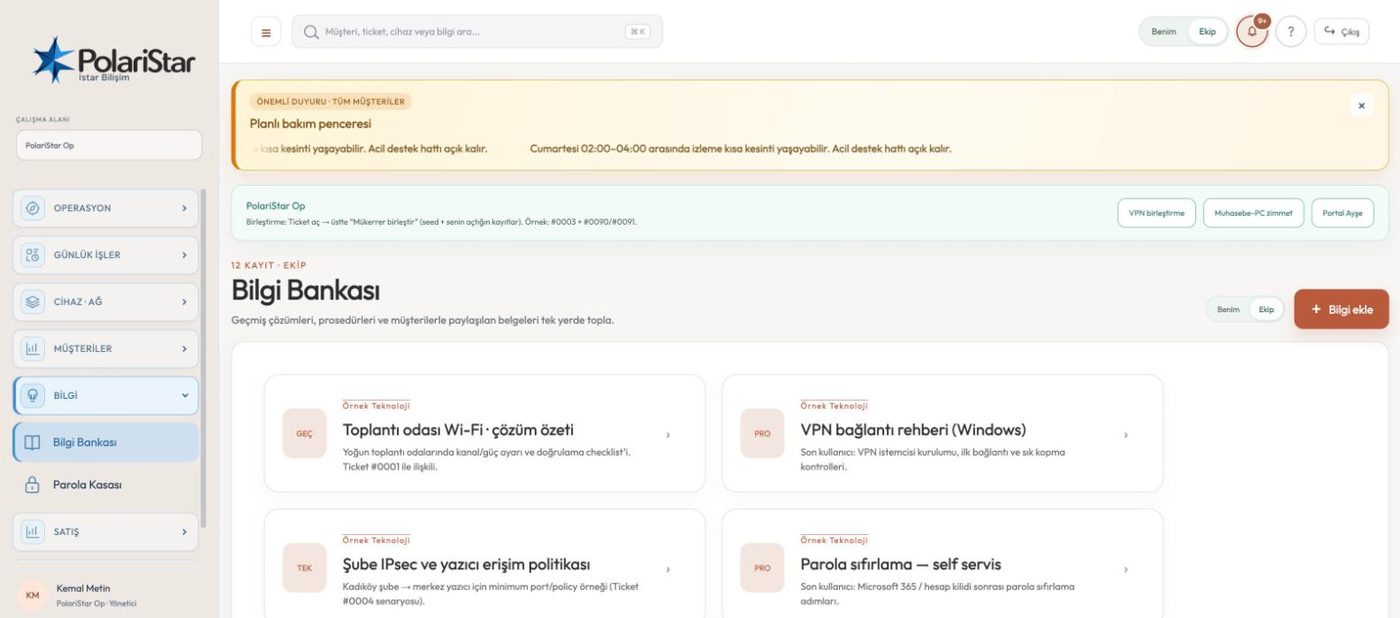
The knowledge base is an archive of solutions and documents. It has its own place in the main menu: it lists the records, and an add-knowledge action opens a new one. The archive lives in the same data space as tickets and tasks, so looking up a solution does not mean leaving for a separate wiki. The global search in the top bar covers knowledge records alongside customers, tickets and devices. Controlled publishing, the approval chain and version management are on the roadmap, and the points below say which is which.

From the PolariStar panel, with demo data.

Solution and document archive

The module sits under the KNOWLEDGE group as its own menu item. Solution notes and documents collect in one list. A new record opens from the add-knowledge action — no separate tool to install, no second account to manage.

Alongside the ticket record

Knowledge records are kept in the same database and the same panel as tickets and tasks. In practice that means the archive is a tab in the panel you already work in, not another system to open. Technical memory does not sit far from where the work is produced.

Found from global search

The search box in the top bar offers customers, tickets, devices and knowledge together. On the organization surface the same box speaks of departments and requests. You do not have to remember which ticket a solution came from.

Bounded by the workspace

The workspace selector at the top left separates the data, and knowledge records fall inside that separation. Records belonging to an organization with its own workspace do not appear in another workspace’s list. In an MSP workspace, though, the support customers share that one space; separation per customer arrives with the article scope on the roadmap.

Secrets stay in the vault

Passwords, SNMP communities and private keys belong not in the knowledge base but in the separate encrypted password vault. The vault keeps those values in encrypted columns, not as plain text. A record says the management password for this device is in the vault; it does not carry the value.

No AI required

Search today does not depend on a language model, so it behaves the same on air-gapped and on-premise installations. Search sends no data to an outside service. Summarizing and suggesting with a local or permitted model is an optional layer that may come later; search will not depend on it.

Roadmap: controlled publishing

The goal is controlled publishing from one source: internal team only, all customers, a selected customer-location-department, or published in the customer portal. The detailed note a technician reads and the short guidance a customer sees would then not need to be two separate records. Articles are to move through draft, in review, approved, published and archived, with viewing, editing, approving and publishing as separate rights. The fixed rule of the scope model: technical detail specific to one customer is never shown to another.

Roadmap: ticket links

The plan is one click at ticket closure to produce a draft article, SOP or checklist, with a two-way link: you would see which job a record came from and which solution was attached to a ticket. Relevant solutions would be suggested while a new request is written, but the suggestion is never a gate — if it does not help, the ticket is opened anyway. Reporting views, helpfulness, linked tickets and an estimate of tickets resolved without being opened belongs to the same goal. So does search, a category view, a helpful/not-helpful signal and opening a ticket from an article in the customer portal.

Roadmap: versions and freshness

Each record is meant to keep a version history, a diff between two versions, rollback and a who-changed-what-when audit trail. An owner, a last-reviewed date and a next-check date would be tracked, and content past its date or long unverified would enter a re-review queue. Warning before publishing when a password has been pasted into the text sits under the same heading.

A solution enters the archive and is found on the next job

  1. 1The solution forms on a ticketThe technician resolves the problem and writes the solution and closing note onto the ticket. At this point the knowledge is inside one record, visible only to whoever opens it.
  2. 2It is added to the knowledge baseOn the Knowledge Base screen you open a record through the add-knowledge action. The solution is no longer buried inside a ticket: it stands on its own and appears in the list.
  3. 3It stays bound to the workspaceThe record belongs to the workspace it was created in. Switch workspace and the menu, the language and the list change — this record is not there.
  4. 4It is searched on the next jobWeeks later a similar symptom arrives and you go to the global search in the top bar, or straight to the module list. Remembering which ticket it came from is not required.
  5. 5The record is read, not rebuiltThe technician reads what was done before instead of reproducing the same diagnosis. On repeat work, this is where the time is saved.
  6. 6The help section in the customer portalThe customer portal carries a Knowledge Base view under the HELP group, where the customer sees the published solutions. Sale prices, cost and profit do not appear on that surface.

Frequently asked

Can another customer see a record I wrote for one customer?

Today the separation is drawn at workspace level: a record written in one workspace does not appear in another one’s list. In an MSP workspace, though, the support customers share that space, so a per-article customer scope does not exist yet and sits on the roadmap. The fixed rule of that scope design: technical detail specific to one customer is not shown to another.

Can I put the device management password in here?

Do not. Passwords, SNMP communities and private keys belong in the encrypted password vault, where they sit in encrypted columns rather than plain text. A knowledge record points at where the value is kept, not at the value.

Does search work on an air-gapped install?

It does. Search does not depend on a language model and no data is sent to an outside service, so on-premise and offline behaviour is the same. Summarizing with a local or permitted model is an optional layer that may come later.

Can I produce an article with one click when closing a ticket?

Not today. You open a record from the Knowledge Base screen and write the solution there. One-click drafts of an article, SOP or checklist at closure, and a two-way link between the two records, are on the roadmap.

What about a record that was right a year ago and is wrong now?

Today you open it and correct it. Version history, diffs between versions, rollback and a re-review queue for content past its date are on the roadmap. Until then the team runs freshness checks on its own schedule.

How much of this module is in use today?

The core record and archive side is in use: the menu, the record list, creating a record, workspace separation and reaching it from global search. Controlled publishing, the approval chain, version management and solution suggestions are on the roadmap. This page marks the two separately.

Who it helps

Support teams trying to cut repeat work, MSPs offering customer self-service, and IT managers who do not want technical knowledge to leave with the person who had it.

Related modules

See it on your own operation

Let us open a workspace for you and try it with your own customers and devices. We will guide you through setup and data migration.